YouGooDai
Mobile of the Day

YouGooDai

5.0 FREE
  • Screenshot 1
  • Screenshot 2
  • Screenshot 3

Description

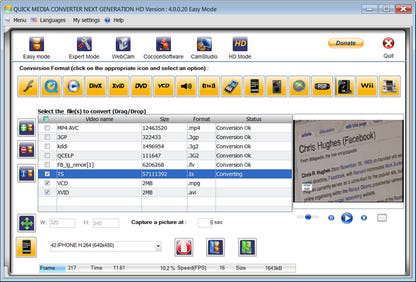
About Quick Media Converter HDQuick Media Converter HD stands out as an all-in-one solution for all your video and audio conversion needs. It is designed to support a wide array of formats, enabling users to easily convert media files into the format of their choice. Whether you are dealing with popular formats or more obscure ones, this software ensures compatibility and delivers high-quality conversions without the hassle of finding and installing additional codecs. Key Feature 1.Batch Conversion Capability Efficiency is key in media management, and Quick Media Converter HD acknowledges this by offering batch conversion features. Users can convert multiple files at once, saving time and effort. This is particularly useful for professionals who work with large quantities of media or for anyone looking to streamline their conversion process. The inclusion of batch conversions allows for a more productive workflow, where users can set up their conversions and focus on other tasks as the software does its work. 2.Built-In Codec Library One of the most significant advantages of Quick Media Converter HD is its self-reliance when it comes to codecs. With an integrated library based on the robust FFmpeg command line program, it eliminates the need for external addons. This built-in codec support includes handling for formats such as KDDI and QCELP, ensuring a broad spectrum of compatibility and reducing the complexity typically associated with media conversion software. 3.Multi-Format Media Player The addition of its own multi-format media player sets Quick Media Converter HD apart from other conversion tools. This feature allows users to preview files before and after conversion, ensuring the output is up to their expectations. The player's ability to handle multiple formats makes it a convenient tool for checking the quality and effectiveness of conversions without the need for third-party software. 4.User-Friendly Interface with Multiple Modes Understanding that users have varying levels of proficiency, Quick Media Converter HD includes three user modes to cater to everyone from novices to experts. The standard conversion setting offers a simple and straightforward experience, allowing users with no particular technical skills to convert media files quickly. This approachability ensures that anyone, regardless of their technical background, can utilize the software to its full potential without a steep learning curve.Reviewed by Cocoon SoftwareShow MoreShow Less

Guides & Tutorials for Quick Media Converter HD

How to install Quick Media Converter HD
  1. Click the Preview / Download button above.
  2. Once redirected, accept the terms and click Install.
  3. Wait for the Quick Media Converter HD download to finish on your device.
How to use Quick Media Converter HD

This software is primarily used for its core features described above. Open the app after installation to explore its capabilities.

User Reviews for Quick Media Converter HD 0

    No reviews found

Similar Apps
